Should websites be able to open your app?
Use local+ for app entry points that other native apps need to call,
but websites should not launch.
Your Windows or macOS app may already handle custom URLs such as myapp:hello.
In supporting browsers with the feature enabled, registering a scheme beginning with local+
blocks web-initiated launches of that scheme. Native apps can still call it through the OS.
What changes for your app
| What you do | Ordinary | Local-only |
|---|---|---|
| Register a scheme | myapp: | local+myapp: |
| Open a URL from another native app through the OS | myapp:hello | local+myapp:hello |
| Open a website link in a supporting browser with the feature enabled | Normal app-opening flow | Blocked |
Windows: register local+myapp using your usual protocol-registration mechanism.
macOS: declare local+myapp in your app's URL schemes.
Registration uses the scheme name without the trailing colon.
Update callers to open the full URL, such as local+myapp:hello, and make sure your handler accepts
the new scheme. The OS dispatches that URL to your app as usual.
This is a new protocol name, not a setting on the old one.
There is no automatic mapping from myapp: to local+myapp:.
Keeping the old scheme wired to the same functionality leaves that entry point reachable from websites.
Keep validating incoming URLs. This is a browser restriction, not authentication or OS-level protection. Unsupported browsers may not enforce it, and administrator policies can override it.
See the browser block, no app installation needed
The links below use toydemo: and local+toydemo:.
No demo app is installed: compare a request that reaches app lookup with one the browser rejects before lookup.
Set up your test browser
Use the latest Chrome Canary or Edge Canary. Fully quit that browser, including any background processes, before running one command below. Then open this page in the new window. These commands use your normal Canary profile, including its existing settings and sign-ins.
Windows (PowerShell)
Chrome Canary:
& "$env:LOCALAPPDATA\Google\Chrome SxS\Application\chrome.exe" --enable-features=LocalOnlyAppProtocolPrefixEdge Canary:
& "$env:LOCALAPPDATA\Microsoft\Edge SxS\Application\msedge.exe" --enable-features=LocalOnlyAppProtocolPrefixmacOS (Terminal)
Chrome Canary:
open -a "Google Chrome Canary" --args --enable-features=LocalOnlyAppProtocolPrefixEdge Canary:
open -a "Microsoft Edge Canary" --args --enable-features=LocalOnlyAppProtocolPrefixThese commands use standard Canary installation locations. Nothing else is installed. This page cannot enable or detect the feature.
- Enable the feature using Set up your test browser above.
- Open DevTools with F12 or Ctrl+Shift+J on Windows, or Command+Option+J on macOS. Select Console and make sure Info and Error messages are visible.
- Click each link below separately. Compare the browser's console messages. The page may look unchanged; the console is the evidence.
Ordinary protocol
toydemo:hello
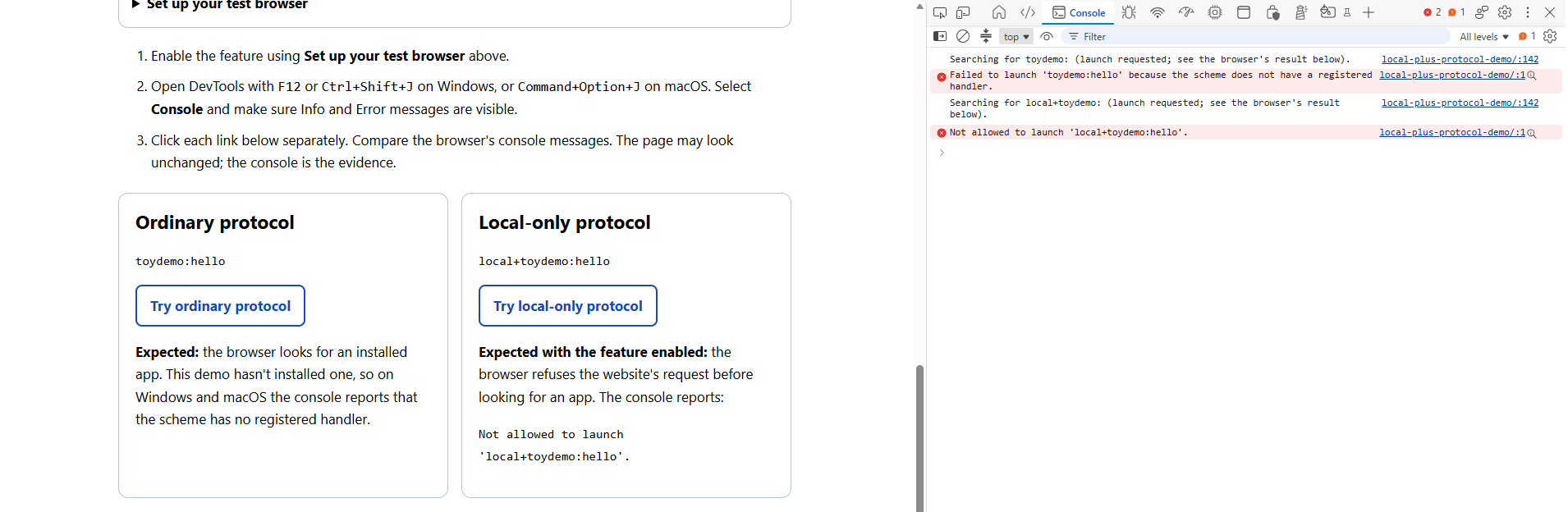
Expected: the browser looks for an installed app. This demo hasn't installed one, so on Windows and macOS the console reports that the scheme has no registered handler.
Local-only protocol
local+toydemo:hello
Expected with the feature enabled: the browser refuses the website's request before looking for an app. The console reports:
Not allowed to launch 'local+toydemo:hello'.
Each click logs the requested protocol. This is a page-generated message, not confirmation that the browser searched for or found an app. Even a deliberate click on a webpage is web-initiated.
These are expected outcomes, not live status indicators. A webpage cannot reliably tell whether an external app launched or read these browser-generated console messages.
No app is supplied or installed. If you already have an app registered for either demo scheme, the ordinary launch flow may offer to open it; cancel that prompt if you do not want to open the app.
Example console output
If both links behave the same
Update Chrome Canary or Edge Canary, fully quit it, and relaunch with
--enable-features=LocalOnlyAppProtocolPrefix. An older browser can accept an unknown feature
flag without implementing it. Enterprise policies can also affect the result.
As a control, fully quit the same compatible browser and relaunch with
--disable-features=LocalOnlyAppProtocolPrefix. Both links should then follow normal
handler lookup, assuming no overriding policies or other restrictions.
What to expect in your own app
This demo only shows the browser blocking a website's request.
It doesn't install an app, so there's nothing to open. To test an actual launch, first register
a local+ URL scheme with your app.
A website link and an address-bar entry are different.
With the feature enabled, a website can't launch your local+ URL.
A user can still enter that URL directly in the address bar and follow the browser's usual
app-opening prompt. Other native apps can also open the URL through the OS.
The restriction depends on the browser. It isn't enforced by Windows or macOS,
and browsers without the feature may still allow website launches. On managed devices, an administrator
can make exceptions using AutoLaunchProtocolsFromOrigins or, where supported,
URLAllowlist. A user's previously saved permission to open the app does not bypass the block.