Privacy
Private by default
Every keystroke stays on-device. No accounts, no servers, no telemetry. Just Chrome's built-in Gemini Nano, doing the work locally.
 WriteGooderer
Star
—
WriteGooderer
Star
—
Now hiring: Gemini Nano
Proofread, rewrite, and shift tone in any text field. Runs on Chrome's on-device Gemini Nano, so nothing you type leaves the browser.
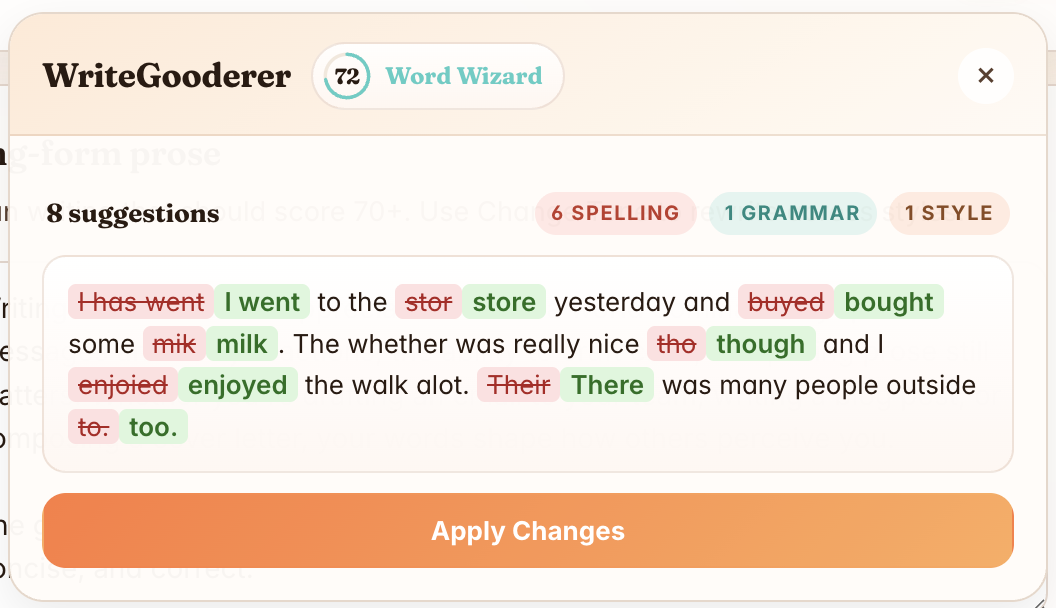
Works in Gmail, Slack, Notion, GitHub, LinkedIn, and the rest of the textareas you live in.
Why this exists
Out of the box, Chrome's on-device Gemini Nano mostly powers Help me write inside the omnibox. For most of us, that's a 4GB roommate sitting around doing nothing. WriteGooderer points the same model at every other text field on the web, so the AI already on your disk has actual work to do.
Privacy
Every keystroke stays on-device. No accounts, no servers, no telemetry. Just Chrome's built-in Gemini Nano, doing the work locally.
Review
A side-by-side diff shows every fix before it touches your draft. Apply the whole rewrite, or only the changes you actually want.
Tone
Switch between Professional, Friendly, LinkedIn Influencer, and Passive Aggressive in one click. Same point, different voice.
How it works
Click into any text field on the page. A small floating
W appears beside it.
Open the card to proofread, check your Gooderness score, or pick a tone.
Skim the diff, then send the edits straight back into your draft.
Install
git clone https://github.com/victorhuangwq/WriteGooderer.git
chrome://extensions and turn on
Developer mode.
dist/ folder.
If the popup says the Prompt API is unavailable, check the requirements for the flag and on-device model setup.
Open source
WriteGooderer is free, MIT-licensed, and built in the open by one person in spare hours. A star takes a second, helps other writers find the project, and is the clearest signal to keep shipping updates.
Star on GitHub —Takes a second. Genuinely makes a difference.